
Black Friday lands on November 27 this year, and Cyber Monday follows three days later. For most online sellers, that means the next six weeks decide a big share of the year’s profit. It also means your competitors will change their prices more often than at any other time.
If you find out about a rival’s price drop three days late, you have already lost those sales. Yet many teams still track competitors the old way: someone opens a dozen browser tabs, copies prices into a spreadsheet and hopes nothing changed overnight.
This guide explains how automated competitor price monitoring works, what the results look like, what it costs in time, and how to decide whether to buy a ready-made tool or have a custom system built. No coding knowledge needed.
What competitor price monitoring actually means
Competitor price monitoring is the regular collection of prices, stock status and promotions from rival websites, so you can compare them with your own. Done well, it answers three questions every morning:
- Who is cheaper than us right now, and by how much?
- Which competitors just ran out of stock (a chance to hold or raise your price)?
- Which products have we priced too low for no reason?
Shoppers do this comparison all the time. Industry research summarizing YouGov data suggests that roughly two out of three consumers check prices online before they buy, even when they end up buying in a store. If your customers compare prices, you need to compare them first.
There is also a clear rise in businesses hiring for this work. Upwork’s In-Demand Skills 2026 report lists Data Extraction among the top data skills clients pay for, and Ecommerce Management as one of the fastest-growing admin skills, up 130% year over year. If any of the signs your business needs data automation sound familiar, price tracking is often the easiest place to start.
Why manual price checks fall apart
Checking a few prices by hand is fine. The trouble starts when the numbers grow. Imagine a store with 150 key products and five main competitors. That is 750 price checks every round.
At about 30 seconds per check, one full round takes over six hours. Do it twice a week and someone spends more than a working day and a half just copying numbers, before anyone has made a single pricing decision.
| Task (150 products, 5 competitors) | Manual, twice a week | Automated, daily |
|---|---|---|
| Collect 750 prices | 12.5 hrs | 0 hrs |
| Clean, match and compare | 2 hrs | 0 hrs |
| Review alerts and decide | 1 hr | 1.25 hrs |
| Total per week | 15.5 hrs | 1.25 hrs |
Time is only half the problem. Manual data is also old by the time you read it, copy-paste mistakes creep in, and the person doing it usually has a more valuable job they should be doing instead.
How automated competitor price monitoring works
An automated system does the same job your team does by hand, just faster and on a schedule. It has four parts.

1. Collect
A small program (often called a scraper) visits each competitor product page on a schedule, for example every morning at 6 a.m., and reads the price, stock status and any sale badge. For fast-moving categories it can run several times a day.
2. Clean and match
Competitors name products differently. “Acme Steel Water Bottle 750ml” on one site might be “Acme Bottle, 0.75 L, Steel” on another. The system matches each competitor listing to your own product, usually by barcode (GTIN), model number or a carefully checked match list. Newer setups can use an AI model to suggest matches for a person to approve, the same idea behind many AI agents for business.
3. Compare
Prices are stored in a database or spreadsheet with a date stamp, so you get history as well as today’s snapshot. The system calculates the gap between your price and the lowest competitor price for every product.
4. Alert and report
Instead of a giant table nobody reads, you get a short summary: “12 products where you are more than 5% above the cheapest rival” and “3 competitors out of stock on items you sell”. This can arrive as an email, a Slack or Teams message, an Excel file or a Power BI dashboard.
What the output looks like
Most business owners want something familiar, so the output is often a simple spreadsheet that updates itself. Each row is one of your products, with competitor prices side by side and a clear status flag.
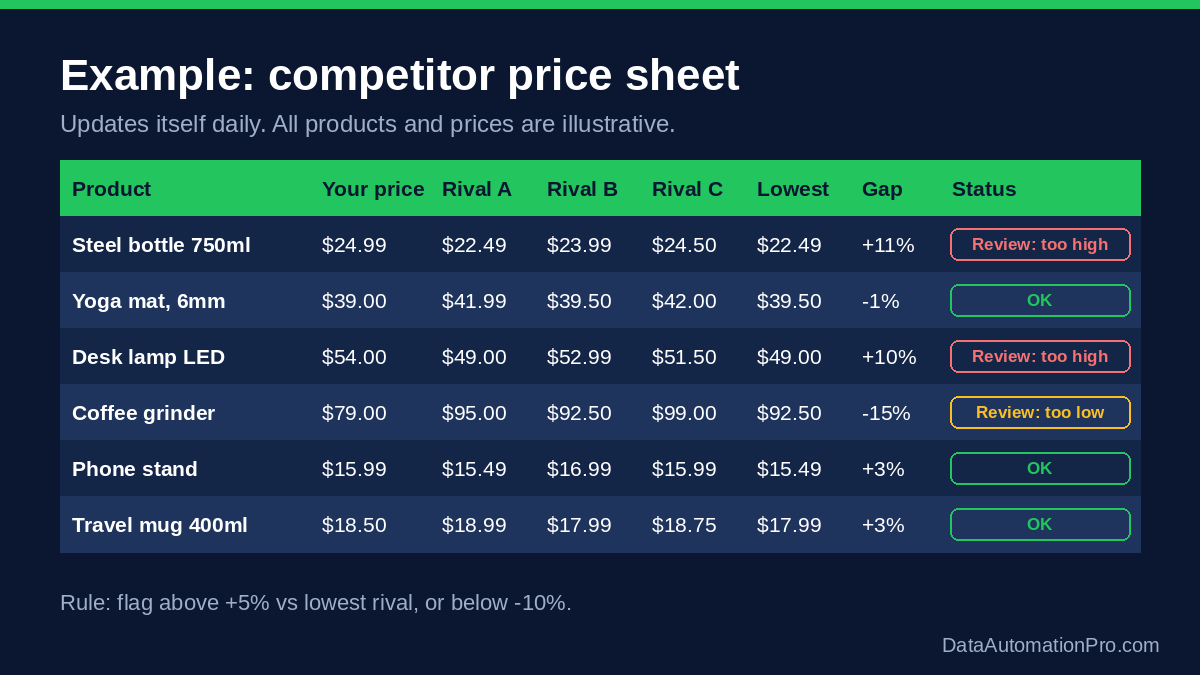
If you already have automated Excel reports with Python or VBA, the price data can simply feed into them. The status column can be a plain Excel formula. Assuming your price is in column B and three competitor prices are in columns C to E:
Lowest rival price (F2):  =MIN(C2:E2)
Price gap % (G2):         =(B2-F2)/F2
Status (H2):              =IF(G2>5%,"Review: too high",IF(G2<-10%,"Review: too low","OK"))
The “too low” check matters as much as “too high”. Many sellers discover they have been underpricing popular items for months and leaving margin on the table.
A peek at the collection step
For the curious, here is a simplified Python example of reading one price from a page. A real system adds scheduling, error checks, polite delays and product matching, but the core idea is this small:
import requests
from bs4 import BeautifulSoup

url = "https://www.example-competitor.com/product/steel-bottle-750"
headers = {"User-Agent": "PriceCheckBot/1.0 (contact@yourcompany.com)"}

page = requests.get(url, headers=headers, timeout=20)
soup = BeautifulSoup(page.text, "html.parser")
price_text = soup.select_one(".product-price").get_text(strip=True)

price = float(price_text.replace("$", "").replace(",", ""))
print(price)  # e.g. 24.99
The hard part is not this code. It is keeping dozens of these readers working when competitors redesign their sites, catching silent failures, and matching products correctly. That ongoing upkeep is the real cost of any monitoring system.
Buy a tool or build your own?
You have three realistic options. Ready-made price tracking tools are fast to start. A custom system costs more upfront but fits your exact competitors and workflow. Many businesses end up with a mix.
| Option | Best for | Main upside | Main downside |
|---|---|---|---|
| Off-the-shelf tool | Big marketplaces, standard products | Live in days | Monthly fees; may not cover niche rivals |
| Custom-built system | Niche sites, tricky matching, own data | Fits your process exactly; you own the data | Upfront build plus upkeep |
| Hybrid | Growing catalogs | Tool for easy sites, custom for the rest | Two systems to manage |
Use the checklist below to see which one fits you.
| Question | If yes | Likely best fit |
|---|---|---|
| Are most rivals on Amazon or other large marketplaces? | Tools already cover them well | Off-the-shelf tool |
| Do you compete with small or regional sites? | Tools often skip them | Custom or hybrid |
| Do products need careful matching (bundles, sizes, variants)? | Generic matching gets it wrong | Custom |
| Do prices need to flow into Excel, Power BI or your store? | You need a clean integration | Custom or hybrid |
| Fewer than 50 products and 2–3 rivals? | Small scope | Simple tool or light script |

Staying on the right side of the rules
Collecting publicly visible prices is a common business practice, but it should be done responsibly. A well-built system follows a few simple rules:
- Public pages only. No logging in, no getting around paywalls or security checks.
- Be polite. Space out requests so you never slow a competitor’s site down, and respect their robots.txt file where it applies.
- Read the terms. Some sites restrict automated access in their terms of service. Some offer an official feed or API, which is always the better route.
- Prices, not people. Collect product data only, never personal data such as reviewer names, which brings privacy laws like GDPR into play.
Rules differ by country and by site. This is general guidance, not legal advice, so for a large or high-stakes program it is worth a quick check with a lawyer.
Getting started before the holiday rush
You do not need to monitor your whole catalog on day one. A sensible first step looks like this:
- Pick your top 50 to 150 products by revenue or margin.
- List three to five competitors that customers actually compare you with.
- Decide your rules, for example “flag anything more than 5% above the cheapest rival”.
- Choose where results should go: email, Excel, Power BI or straight into your store.
- Run it daily for two weeks to learn how often prices really change, then adjust the schedule.
A focused setup like this can usually be built and tested in one to two weeks, which still leaves time to use it through Black Friday and Cyber Monday.
Frequently asked questions
How often should I check competitor prices?
Daily is a good starting point for most stores. During big sales events, or in fast-moving categories like electronics, several checks a day make sense. Measure how often prices actually change before paying for more frequent runs.
Is scraping competitor prices legal?
Collecting publicly visible prices is widely practiced and generally accepted when done politely, without logging in or bypassing protections, and without collecting personal data. Laws and site terms vary, so check with a legal advisor for larger projects.
Can Copilot or ChatGPT do this for me?
AI assistants can help analyze price data once you have it, but they do not visit hundreds of competitor pages on a schedule and keep a reliable history. That needs a dedicated system. I explain the difference in more detail in my post on Copilot in Excel versus an automation expert.
What happens when a competitor changes their website?
The reader for that site may stop working. A good system notices straight away, alerts you, and flags suspicious values (like a 90% overnight drop) instead of passing bad data into your reports. Fixing it is usually a small update.
Can the prices update my store automatically?
Yes, but start with alerts and human approval. Once you trust the data and your rules, the system can push approved price changes to Shopify, WooCommerce or your own platform.
Let’s set up your price monitoring
I’m Rashed Khan, a Top Rated freelance data automation specialist working with businesses across the US, UK, Canada and Europe. I build web scraping and price monitoring systems in Python, and connect the results to the tools you already use: Excel, Power BI dashboards, Django web apps or AI-powered matching.
Send me your list of competitors and key products, and I’ll reply with a clear plan, a realistic timeline and a fixed quote. Contact me to book a free 20-minute automation review and go into the holiday season knowing exactly where your prices stand.