

If your team pays for Microsoft 365 Copilot, you have probably asked yourself this: why hire an automation expert when Excel can now build the spreadsheet for you?
It’s a fair question. Copilot’s Agent Mode became generally available in April 2026. It can now write formulas, build pivot tables and add charts from a single plain-English request. In September 2026, Copilot editing also reached Excel on the iPad. Spreadsheets that took an analyst an hour can now take a few minutes.
But Copilot and a real automation system solve different problems. This guide explains, in plain terms, what Copilot in Excel automation can do for your business today, where it stops, and how to tell which one you need.
What Copilot in Excel actually does well
Think of Copilot as a very fast assistant sitting inside one workbook. You describe what you want, and it does the clicking and typing for you.
In Agent Mode, it plans a task in several steps, carries them out and checks its own work. You can watch it reason and redirect it as it goes. In practice, that means it is good at:
- Building a workbook from scratch, such as a budget tracker, a loan calculator or a simple sales summary.
- Writing formulas you’d otherwise search for, including newer functions like LET, FILTER and XLOOKUP.
- Creating pivot tables and charts, for example a year-over-year comparison by region.
- Cleaning up data, such as splitting names, fixing dates or flagging duplicates.
- Explaining a messy file someone else built, so you can understand it before you change it.
For one-off questions and quick analysis, it is a real time-saver. If your need is “help me build this sheet today”, Copilot may be all you need.
Where Copilot stops (and why it matters)
The limits are not about intelligence. They are about how Copilot is designed. It responds when you ask it something. It does not run your business processes in the background.
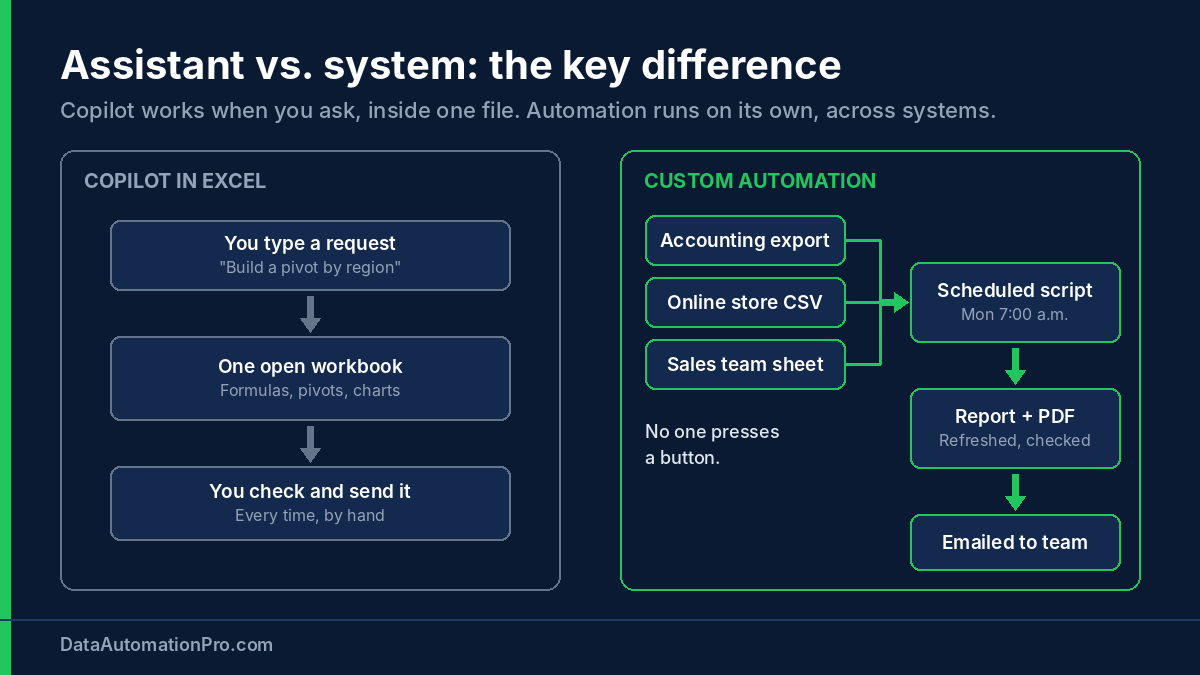
It works on one open workbook at a time
Agent Mode acts on the file you have open. It cannot reach into your other workbooks, your inbox, your CRM or your accounting system. Most real reporting pain lives between those systems. Think of the export from QuickBooks, the CSV from Shopify and the sheet from your sales team, all copied together every Monday.
It doesn’t run on a schedule
Copilot waits for a prompt. Nobody presses a button at 7 a.m. to refresh last week’s numbers, save a PDF and email it to the managers. A scheduled script or Power BI refresh does that every day without anyone touching it.
Its changes need checking
Changes are applied straight to your workbook, and AI can still get numbers wrong, especially on large or unusual data. Microsoft and independent reviewers both say a person should review the output. That’s fine for a one-off file. It becomes a hidden cost when the same report is rebuilt every week and someone has to re-check it each time.
Repeatability is not guaranteed
Ask Copilot the same question twice and you may get two slightly different approaches. For a monthly board report or an invoice process, you want the exact same logic every time. You also want an audit trail you can explain to an accountant.
Licensing adds up
For business plans, Copilot is a paid add-on on top of an eligible Microsoft 365 plan. At launch it was listed at about $30 per user per month. For a team of ten, that’s a recurring cost you should compare against a one-time automation build. Check Microsoft’s current pricing for your plan.
Copilot vs. an automation expert: a quick comparison
| Need | Copilot in Excel | Custom automation (VBA, Python, Power BI) |
|---|---|---|
| Build a one-off sheet or chart | Excellent | Overkill |
| Explain or tidy a messy file | Very good | Not needed |
| Combine data from several files or systems | Limited to the open workbook | Built for this |
| Run every day or week without anyone | No | Yes (scheduled) |
| Same result every time, with an audit trail | Not guaranteed | Yes |
| Live dashboards for managers | Basic charts | Power BI with auto-refresh |
| Connect to databases, APIs or web apps | No | Yes (Python, Django, PostgreSQL) |
| Ongoing cost | Per-user subscription | Mostly one-time build plus light upkeep |
The pattern is simple. Copilot helps a person work faster. Automation removes the task from the person’s week entirely.
A practical example: the Monday sales report
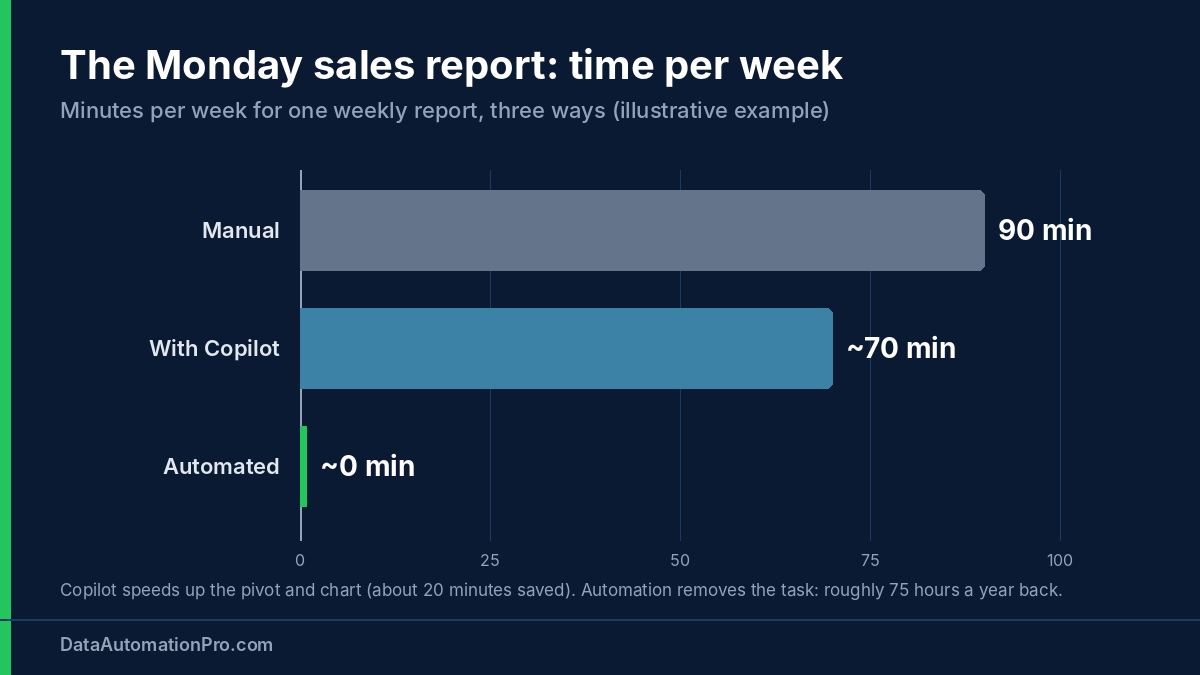
Here is a situation many of my clients describe. Every Monday, an operations manager downloads three CSV files, pastes them into a master workbook, refreshes a pivot table, saves a PDF and emails it to five people. It takes about 90 minutes.
With Copilot, the manager can ask it to build the pivot and chart faster. That might save 20 minutes. But they still download, paste, check and send by hand, every week.
Here is where the time goes each week:
| Step | Manual | With Copilot | Automated |
|---|---|---|---|
| Download three CSV files | 15 min | 15 min | Automatic |
| Paste and tidy into the master workbook | 30 min | 30 min | Automatic |
| Build or refresh the pivot and chart | 25 min | ~5 min | Automatic |
| Save and check the PDF | 10 min | 10 min | Automatic |
| Email it to five people | 10 min | 10 min | Automatic |
| Total per week | 90 min | ~70 min | ~0 min |
With a small automation, the whole job runs on its own. Here is a simplified VBA version of the core step. It opens every CSV in a folder and appends the rows to one sheet:
Sub CombineWeeklyCSVs()
    Dim folder As String, fileName As String
    Dim target As Worksheet, src As Workbook
    Dim nextRow As Long

    folder = "C:\Reports\Weekly\"
    Set target = ThisWorkbook.Sheets("Data")
    target.Range("A2:Z100000").ClearContents

    fileName = Dir(folder & "*.csv")
    Do While fileName <> ""
        Set src = Workbooks.Open(folder & fileName)
        nextRow = target.Cells(target.Rows.Count, 1).End(xlUp).Row + 1
        src.Sheets(1).UsedRange.Offset(1).Copy target.Cells(nextRow, 1)
        src.Close SaveChanges:=False
        fileName = Dir
    Loop

    ThisWorkbook.RefreshAll   ' updates every pivot table and chart
End Sub
In a full project, I would add steps to export the summary as a PDF and email it through Outlook. Windows Task Scheduler then runs it every Monday at 7 a.m. If the data lives in an online system, a short Python script can pull it directly from the source’s API, so nobody downloads anything.
The result: 90 minutes a week becomes zero. That’s roughly 75 hours a year for one report, with the same logic applied every time.
The best answer is often both
You don’t have to choose. The strongest setups I build for clients use each tool where it’s strongest:
- Automation handles the plumbing. Scripts or Power Query pull, clean and combine data on a schedule.
- Power BI or a clean Excel model presents it. Managers see live numbers without asking anyone.
- Copilot handles the questions. Once the data is clean and in one place, staff can ask Copilot “Why did the North region drop in August?” and get a useful answer.
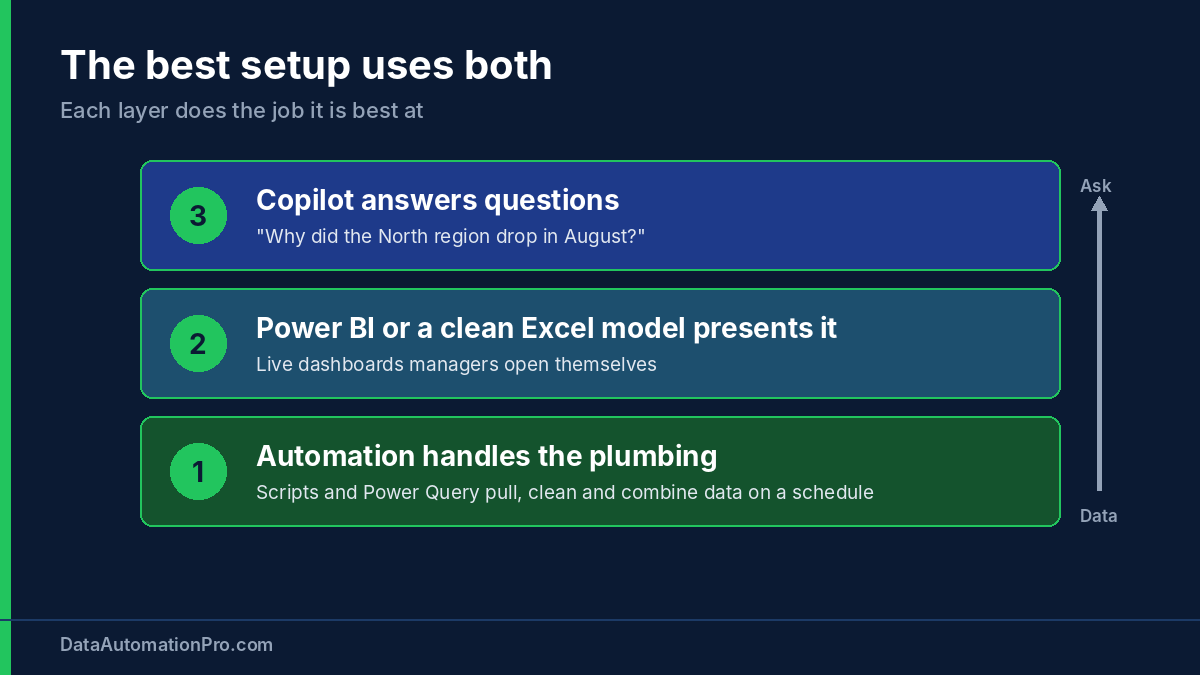
That last point matters. Copilot gives much better answers on tidy, well-structured data. A good automation layer makes your Copilot subscription more valuable, not less.
How to decide in five minutes
Ask yourself these questions about the task you want to fix:
| Question | If the answer is yes | Best fit |
|---|---|---|
| Does it repeat weekly, daily or monthly? | It is an automation candidate | Automation |
| Does it touch more than one file or system? | Copilot alone won’t cover it | Automation |
| Would a mistake be costly (invoices, payroll inputs, client reports)? | You want fixed, tested logic | Automation |
| Is it a one-time analysis or a quick question? | Speed matters more than repeatability | Copilot first |
If you answered yes to the first three, you’re likely losing hours every month that a one-time build could give back. Demand reflects this. Upwork’s 2026 in-demand skills report found that hiring for AI integration work grew 178% year over year. Businesses are learning that AI tools pay off most when someone connects them to real workflows.
Frequently asked questions
Can Copilot in Excel replace VBA macros?
Not fully. Copilot can write and explain formulas, and it can help you draft code. But it does not run tasks on a schedule or across several files on its own. A tested macro or Python script still does that job more reliably.
Is Copilot in Excel included in Microsoft 365 Business plans?
Basic Copilot chat features come with many plans. Agent Mode inside Excel for business users generally requires the paid Microsoft 365 Copilot add-on on an eligible plan. Check with your IT admin or Microsoft’s current pricing page.
Is my data safe if I use Copilot?
Copilot for business runs under your organization’s Microsoft 365 security and permission settings. Agent Mode does rely on cloud models, so it is not fully offline. For highly sensitive data, a local option, such as a private AI model run with Ollama, can keep everything on your own servers.
How long does a typical Excel or Power BI automation take to build?
A single recurring report usually takes a few days, including testing. A multi-source Power BI dashboard or a small web app can take two to four weeks, depending on how many systems it connects to.
I already have Copilot. Is hiring an automation expert still worth it?
If your team repeats the same data tasks every week, usually yes. The build is mostly a one-time cost, and it also makes Copilot’s answers better by giving it clean, combined data to work with.
Let’s automate the work Copilot can’t
I’m Rashed Khan, a Top Rated freelance data automation specialist. I help businesses in the US, UK, Canada and Europe turn manual spreadsheet work into systems that run on their own. That includes Excel and VBA automation, Power BI and DAX dashboards, Python and Django apps, and AI pipelines built with LangChain, LangGraph and Ollama.
Tell me about one report or process that eats your team’s week. I’ll reply with a clear plan, a realistic timeline and a fixed quote. Contact me to book a free 20-minute automation review, and let’s get those hours back.