
Every business reaches a tipping point. More and more companies are turning to data automation for business operations — and for good reason. Manual processes that once worked are now costing real money.
At first, a few spreadsheets are enough. Your team enters data by hand. They build reports manually. They copy information between systems. It works — for a while.
But as your business grows, those manual processes start costing you real money. Hours are wasted every week. Errors slip through. Decisions get made on outdated data.
So the question is not whether your business needs data automation. The real question is: how long can you afford to wait?
So the question is not whether your business needs data automation. The real question is: how long can you afford to wait? The right data automation for a business solution can eliminate these problems.
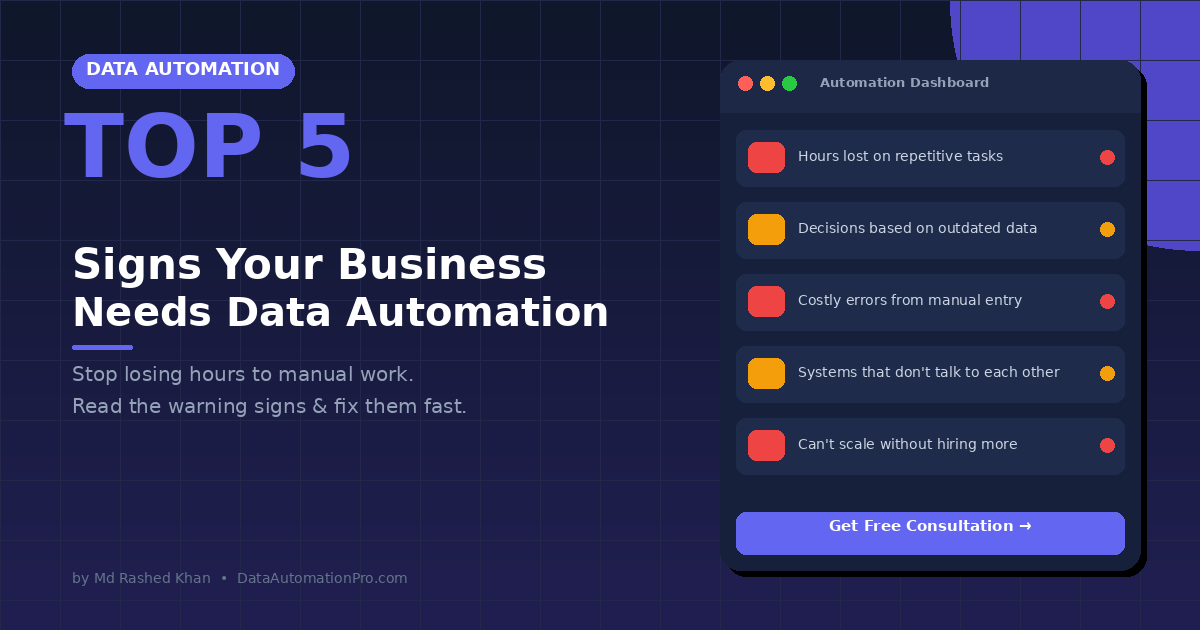
Here are the top 5 signs that your business urgently needs data automation — and exactly what to do about each one.
Sign 1: Your Team Loses Hours to Tasks That Data Automation for Business Can Handle
Does your team copy data between spreadsheets every single day? Do they reformat the same reports every week? If so, that is a clear warning sign.
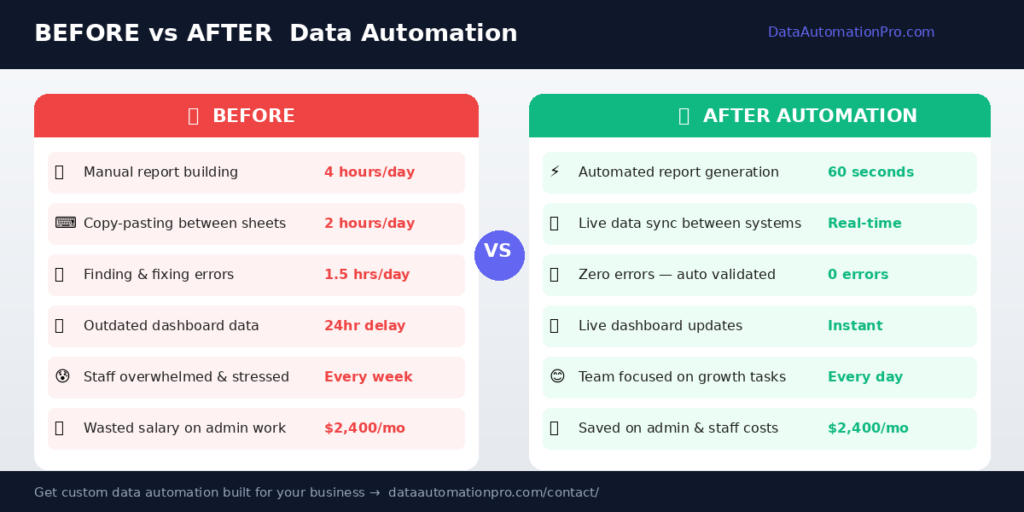
For example, if just one employee spends 2 hours daily on manual data tasks, that adds up fast. It becomes 10 hours per week. It becomes 40 hours per month. And it becomes nearly 500 hours per year — all on work that automation can handle in seconds.
Furthermore, this is not just a time problem. It is a motivation problem too. Your best people are doing work that a computer should be doing.
Common warning signs:
- Staff manually copy data between Excel files or systems
- Reports that take hours to build are rebuilt from scratch every week
- Employees stay late just to finish data entry
The fix: Custom Excel VBA macros and automated reporting tools can eliminate these tasks entirely. According to Microsoft, businesses using Excel automation reduce manual reporting time by up to 80%. What takes your team 3 hours can be done in under 60 seconds.
Sign 2: Outdated Data — A Major Data Automation for Business Problem
How old is the data behind your last big business decision?
If your sales report is from last week, or your inventory figures are from yesterday, you are flying blind. As a result, bad decisions follow. Opportunities get missed. And costly mistakes happen more often than they should.
Consequently, businesses that automate their data processes gain access to real-time dashboards that update automatically. Therefore, you can see exactly what is happening in your business — right now — without waiting for anyone to compile a report.
Common warning signs:
- Management meetings start with “wait, let me update the numbers”
- You discover problems days or weeks after they happen
- Different departments work from different versions of the same data
The fix: Power BI dashboards are one of the best data automation for business tools available. Connected directly to your data sources, they give you live, accurate numbers at all times — with zero manual effort.
Sign 3: Errors Are Costing You Time and Money
Manual data entry causes errors. In fact, studies show that human error rates in manual data entry range from 1% to 4%. That sounds small. However, at scale, the impact is enormous.
For instance, on 10,000 transactions, that means up to 400 errors. Each error takes time to find, investigate, and fix. Moreover, some errors never get found — and those are the most dangerous ones of all.
Common warning signs:
- Your team regularly finds and corrects mistakes in spreadsheets
- Invoices, orders, or reports contain occasional but costly errors
- You have lost a client or faced a compliance issue due to bad data
The fix: Automated data workflows validate, clean, and process your data without human intervention. Therefore, the root cause of errors is eliminated entirely — not just managed. This is exactly why data automation for business has become essential — not optional.
Sign 4: Your Systems Do Not Talk to Each Other
Most businesses use multiple tools. They use accounting software, a CRM, inventory management, HR systems, and various spreadsheets. However, if these systems do not share data automatically, someone has to transfer information between them manually.
As a result, dangerous data silos form. The left hand does not know what the right hand is doing. Furthermore, this creates a situation where the same information lives in multiple places — and is often out of sync.
Common warning signs:
- You export data from one system and import it into another by hand
- Finance and sales have different numbers for the same metric
- Customer information is stored in three different places
The fix: System integration connects your tools so data flows automatically between them. Consequently, there are no more manual exports, no copy-pasting, and no outdated information holding your team back.
Sign 5: You Cannot Scale Without Hiring More People
When the only way to handle more work is to hire more staff — you have a process problem, not a people problem.
Healthy business growth should not require a proportional increase in headcount for data and admin tasks. For example, if doubling your sales means doubling the time your team spends on manual reporting — your processes are broken.
Additionally, data automation lets you scale your output without scaling your costs. As a result, the same automated system that handles 100 orders today can handle 10,000 orders tomorrow — with zero extra effort.
Common warning signs:
- Every time revenue grows, your admin workload grows at the same rate
- You are considering hiring just to handle data entry and reporting
- Your team is overwhelmed not by complex work but by sheer volume
The fix: A well-designed automation system grows with your business. Build it once. Therefore, it scales indefinitely — without adding headcount or cost. This is the true power of data automation for business — scale without limits.
How to Get Started with Data Automation
If you recognized your business in any of the signs above, the good news is this: the solution is closer and more affordable than you think.
First, you do not need to replace your existing software. Second, you do not need a large IT team. Third, you do not need to wait months to see results.
Here is a simple 3-step starting point:
Step 1 — Identify your biggest pain point. Which manual process costs your team the most time every week?
Step 2 — Start small. Automate one process first. Measure the time saved. Then build from there.
Step 3 — Work with an expert. A custom-built solution tailored to your exact workflow delivers far better results than any generic software.
At DataAutomationPro, we have helped over 1,500 businesses across 30+ countries eliminate manual work, reduce errors, and scale their operations. We build custom Excel automation tools, Power BI dashboards, ERP systems, AI agents, and smart workflows — all designed around your exact business.
Conclusion
Data automation for business is not just about saving time. It is about building a business that can grow without breaking.
Manual data work is not just inefficient — it is actively holding you
If your team spends hours on repetitive tasks, works with outdated data, deals with errors, or struggles to scale — it is time to automate. Furthermore, the businesses growing fastest right now are not working harder. They are working smarter.
With the right automation in place, your team can finally focus on what actually matters: growing the business.
Ready to find out how data automation can transform your workflow?
About the Author: Md Rashed Khan is a data automation expert with 10+ years of experience building custom Excel tools, Power BI dashboards, ERP systems, and AI agents for businesses across 30+ countries. Connect on Upwork or Freelancer.